Wasted spend
Budget keeps chasing people who never pay.
Signal purity for performance marketing
Paid Signal tells your ad channels who actually paid — so Meta, TikTok, Snapchat and Google optimize for real customers, not order forms.
Paid Signal is live on the Shopify App Store. Install it on your store, connect the channels you already run, and the first verified paid event fires the next time you mark an order as paid. Billing runs through Shopify on your regular invoice.
 7 days free on every plan · setup guides
01 — The problem
Placing an order is a click. Getting paid is the business. The distance between them is where your ad budget quietly leaks — and your dashboard never shows it.
In cash-on-delivery and refund-heavy markets, a large share of orders are refused at the door, returned, or simply never paid. Yet your ad platforms count every one of them as a win, and go looking for more people just like them.
Nearly half of every order never becomes revenue you can optimize on. Illustrative.
Budget keeps chasing people who never pay.
Failed deliveries and refusals pile up.
Your channels get trained on non-payers.
Packing, shipping and re-stocking costs climb.
02 — Why it happens
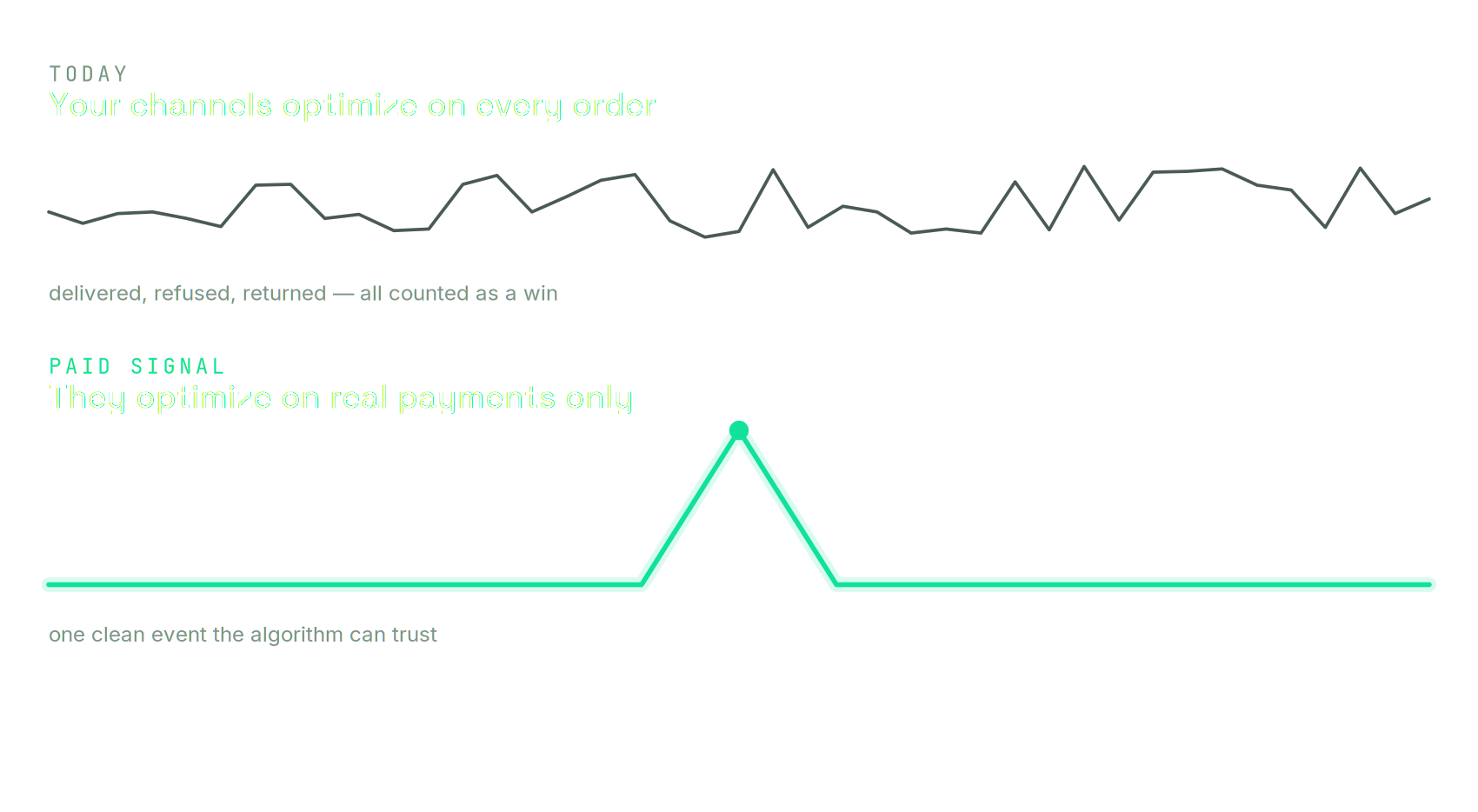
Delivered, refused, returned — every order counts as a win. So the algorithm optimises toward more of all of it. Paid Signal gives it one clean event to trust instead.
The fix
Paid Signal confirms the revenue that actually lands and sends that clean signal to your ad platforms. Your campaigns keep running exactly as they are — they just learn from real customers now.
Every channel opens a step-by-step walkthrough — the actual screens, in order, with the field you need on each one. When you press Finish, Paid Signal checks the connection against the platform itself and tells you it is live, or tells you exactly what is missing. Watch the setup guides.
Paid Signal identifies the orders that turn into real, collected revenue — the payments that truly land.
That verified signal flows to your channels, so they optimise on the people who actually pay.
The shift
Better audiences
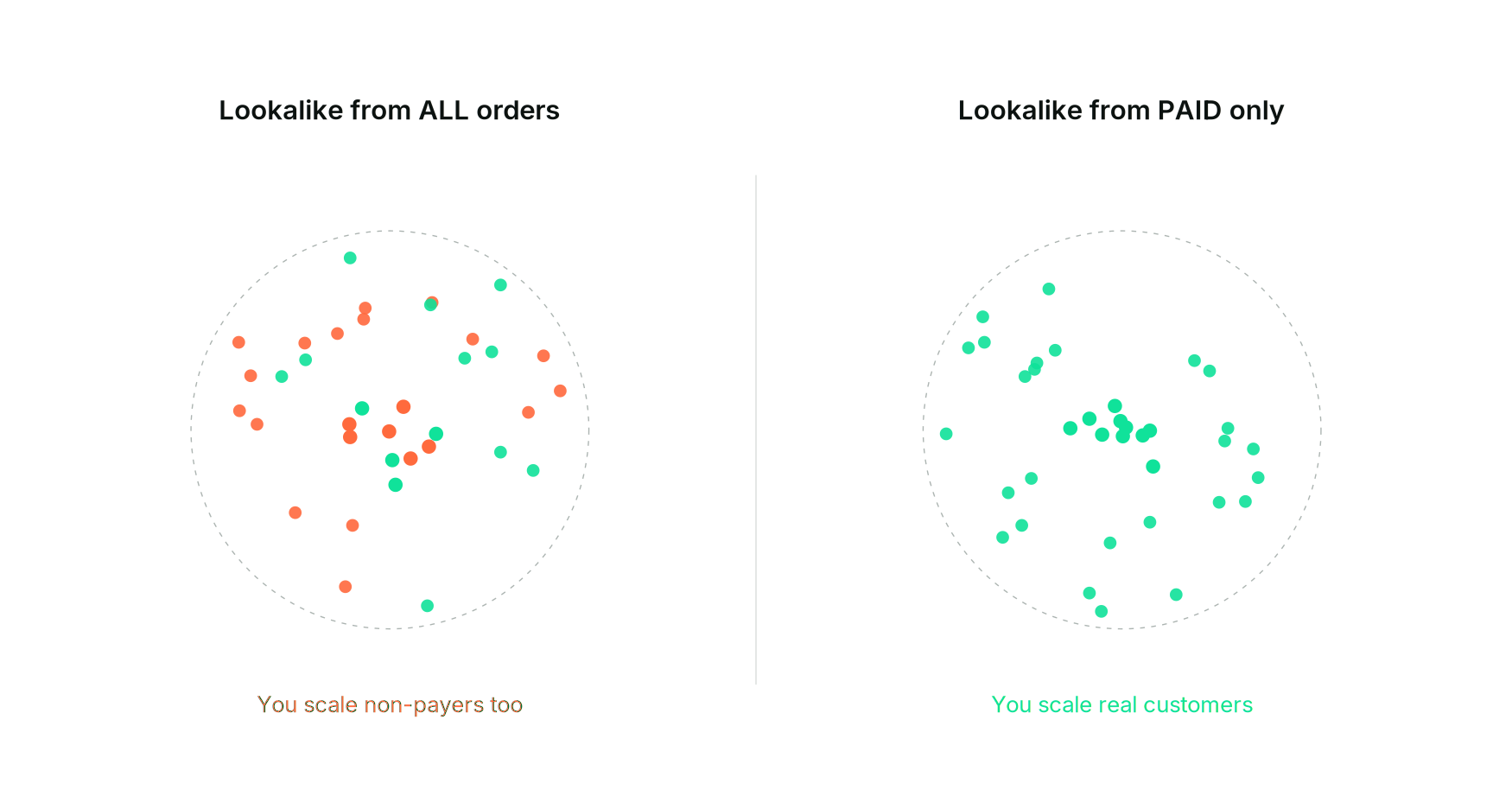
Feed the channels your real payers, and they'll go find more of them — not more window-shoppers.
The outcome
Paid Signal follows the whole journey — page views, product views, add to cart, checkout started, and the payment — so the dashboard can show you where the money leaks and which source it came from. What leaves for your ad platforms is deliberately narrower: the order, the confirmed payment, and the refund. Browsing belongs to your own pixel. We only speak up when money moves.
Figures are illustrative and show the direction of impact. Actual results vary by account, market and category.
COD operations
A verified paid event tells your channels which orders became money. These four tell you about the ones that did not — and get the cash you did collect into Shopify the same day.
Upload the sheet your courier sends you — Bosta, Mylerz, Aramex, J&T or any CSV/Excel — and every order it collected cash for is marked paid in Shopify. Being paid is what sends the conversion, so your ads learn the same day the cash lands, not when someone gets round to the admin. Returns on the sheet are recorded as refusals. A preview shows every row before anything is written.
All plans
Every new COD order gets one tag from that customer’s own history with your store, within seconds: refused twice or more, refused once, trusted, or new. Your call center sees it in the orders list and Shopify Flow can act on it — confirm the risky ones by phone, skip the call for the trusted ones. The app never holds or cancels an order. It informs.
Growth and above
One screen for the orders that never became money: refusal rate and lost revenue by governorate, by price band, by product, by courier — week by week. Click a governorate or a band and every number re-cuts to it. Rates are withheld below 20 orders, so a small segment cannot mislead you.
Growth and above
A Custom Audience on Meta and Snapchat of customers who refused two or more COD orders and have not paid since — kept current automatically, removed the moment they pay. Exclude it in your ad sets. It is not a ban: they can still buy, you simply stop paying for ads to reach them.
Scale and above
Risk tags and refusal history are built from that customer’s orders with your store only. There is no shared or cross-store blacklist. Anything that writes to an order stays off until you switch it on, and every switch is recorded.
Why teams switch
When channels chase payers, more parcels land and more carts get paid.
Optimise toward collected revenue, not clicks that never convert.
Spend follows buyers, so every dollar works harder.
Only confirmed payments are reported, so nothing trains on non-payers.
Attract customers who keep and pay for what they order.
Keep your campaigns. Point them at the people who pay.
Built for
Where refused and returned orders wreck your numbers.
Scaling paid spend and tired of low-quality orders.
Chasing ROAS that reflects real, collected revenue.
Proving results on money that lands, not clicks.
Pricing
Every plan covers one store and is billed on the orders that actually turn into paid, collected revenue — never on window-shoppers.
300 paid orders included, then $0.13 each
1,500 paid orders included, then $0.09 each
6,000 paid orders included, then $0.06 each
20,000 paid orders included, then $0.03 each
Swipe the table to compare plans
| Compare plans | Starter | Growth | Scale | Enterprise |
|---|---|---|---|---|
| What it costs | ||||
| Monthly price | $9 | $49 | $149 | $299 |
| Paid orders includedonly orders where the money arrived | 300 | 1,500 | 6,000 | 20,000 |
| Each extra paid ordercharged only above the allowance | $0.13 | $0.09 | $0.06 | $0.03 |
| What you get | ||||
| Ad channelsMeta, TikTok, Snapchat, Google — enforced on your destinations | 2 of 4 | All 4 | All 4 | All 4 |
| Storesone workspace per connected store | 1 | 1 | 1 | 1 |
| Ad accounts per channelmore than one advertiser or business id | 1 | 1 | Multiple | Multiple |
| Verified paid-event optimizationthe event fires only once the money is confirmed | ✓ | ✓ | ✓ | ✓ |
| Refund correctionsreversals are tracked, and exported to Google as retractions | ✓ | ✓ | ✓ | ✓ |
| Full order ledgerevery order, paid or not, with its signal state | ✓ | ✓ | ✓ | ✓ |
| Payer audience seeds for Lookalikesthe customers who actually paid, ready to seed an audience | ✓ | ✓ | ✓ | ✓ |
| Auto-synced payer audiencesMeta & Snapchat audiences the app keeps current — refunds and returns are removed | — | — | ✓ | ✓ |
| Lost-order insightsof settled orders, how many never became money — and which source they came from | — | ✓ | ✓ | ✓ |
| Courier sheetsupload the sheet your courier already sends you; collected orders are marked paid, returns become refusals | ✓ | ✓ | ✓ | ✓ |
| Risk tags on new COD ordersfrom that customer’s history with your store only — no shared blacklist | — | ✓ | ✓ | ✓ |
| Refusal analyticsrefusal rate and lost revenue by governorate, price band, product and courier | — | ✓ | ✓ | ✓ |
| Repeat-refuser audiencesMeta & Snapchat audiences of customers who refused twice or more and have not paid since | — | — | ✓ | ✓ |
| Supporthow you reach a human | Priority | Priority + guided onboarding | Dedicated success manager | |
| Uptime SLA + custom integrationsa written availability commitment | — | — | — | ✓ |
Plans are billed by Shopify and appear on your regular Shopify invoice — we never take payment directly. Paid orders above your allowance are reported to Shopify as usage.
More than 20,000 paid orders a month? Let’s talk.
Questions
No. Keep your pixel exactly as it is. Paid Signal adds a separate server-side event that fires only when money is confirmed, so the platforms get a clean signal alongside your normal tracking.
Whatever Shopify calls paid: a captured card, or a COD order you mark paid once the cash is in hand. That single rule is the whole product — if the money is not real, no event fires.
No. Paid Signal never talks to a courier. If your courier updates Shopify, a Shopify Flow can mark orders paid automatically; if not, mark them manually or in bulk. Works with any courier, or none.
No. Every event carries a stable ID, so a redelivered webhook or a repeated sync can never fire twice. The event name is distinct from your pixel purchase, so you choose which one campaigns optimise on.
No. You keep the same campaigns, creatives and structure. Paid Signal changes the signal they learn from — there is no new playbook to adopt.
Identity (email, phone, name, city) is hashed with SHA-256 before it is ever written down — we cannot read it, and neither can anyone with database access. That hash is what the ad platforms need for matching. We never store card details.
Meta, TikTok and Snapchat receive events through their server APIs. Google Ads connects from the same screen, and Google Analytics 4 is available too and does not count against your channel limit.
Yes — that is most of the dashboard. You see every event sent per channel, the reversal rate per signal source (how much of your seed later refunded), and an order-by-order ledger of what fired and what did not.
You can also check outside the app: every event Paid Signal sends arrives stamped as Paid Signal in Meta Events Manager and in Snapchat’s Events Manager, so you can confirm the source without taking our word for it.
Plans start at $9 per month and are billed on paid orders, not on every order placed. Each plan includes a monthly allowance of paid orders (300 on Starter, 1,500 on Growth, 6,000 on Scale, 20,000 on Enterprise) and anything above it is charged per additional paid order. Billing is handled by Shopify and appears on your regular Shopify invoice. See pricing for the full breakdown.
Send us a note using the form below. Tell us about your store and the channels you run, and we’ll get you set up.
Talk to us
We read every message.